Chapter 4: ROS 2 Architecture and Core Concepts
4.1 Introduction to ROS 2
ROS 2 (Robot Operating System 2) represents a significant evolution from its predecessor, ROS 1, designed to address the growing demands of modern robotics applications. While ROS 1 provided a robust framework for roboticists, it faced limitations in areas such as real-time performance, security, and support for distributed systems. ROS 2 was re-architected from the ground up to overcome these challenges, embracing a decentralized and more flexible communication model.
Evolution from ROS 1
ROS 1, released in 2007, was instrumental in popularizing robotics research and development by offering a standardized set of tools and libraries. However, its client-server architecture, reliance on a central master node, and lack of native support for quality of service (QoS) or security proved challenging for deployment in production-grade and mission-critical robotic systems.
ROS 2's development began with a focus on addressing these pain points. Key design goals included:
- Real-time Capabilities: Supporting applications with strict timing requirements.
- Security: Incorporating robust security features by default.
- Distributed Systems: Enabling communication across diverse network environments and heterogeneous computing platforms.
- Modularity: Promoting highly modular and reusable software components.
- Multi-robot Support: Facilitating coordination among multiple robots.
Overview of ROS 2's Architecture
At its core, ROS 2 leverages a decentralized architecture, moving away from the single point of failure inherent in ROS 1's master node. This decentralization is primarily enabled by its reliance on the Data Distribution Service (DDS) standard for all inter-process communication.
The ROS 2 architecture can be visualized as a collection of independent processes (nodes) communicating over a middleware layer provided by DDS. Key characteristics include:
- No Central Master: Nodes discover each other dynamically via DDS.
- Vendor Agnostic: DDS is an open standard, allowing for different DDS implementations (e.g., Fast RTPS, Cyclone DDS) to be used interchangeably.
- Advanced Features: DDS inherently provides Quality of Service (QoS) policies, which allow developers fine-grained control over communication reliability, latency, and throughput.
4.2 Nodes and the Computation Graph
In ROS 2, a node is an executable process that performs computation. Nodes are the fundamental building blocks of any ROS 2 system, designed to be modular and single-purpose. For instance, in a robotic system, there might be a node for reading sensor data, another for processing images, and yet another for controlling robot motors.
What are Nodes?
Each node typically encapsulates a specific function or responsibility. This modularity allows developers to:
- Reuse Components: Individual nodes can be easily reused in different robotic applications.
- Simplify Development: Complex systems can be broken down into smaller, manageable parts.
- Facilitate Debugging: Issues can often be isolated to specific nodes.
- Distribute Workload: Nodes can run on different machines or even different operating systems, communicating seamlessly.
The Concept of a Computation Graph
The computation graph in ROS 2 is a logical representation of the connections and data flow between nodes. Unlike ROS 1, where the graph was managed by a central roscore process, ROS 2's computation graph is a distributed concept, formed dynamically as nodes discover each other and establish communication pathways via DDS.
Key elements of the computation graph include:
- Nodes: The processes performing computation.
- Topics: Named buses over which nodes exchange data asynchronously (publish/subscribe).
- Services: Request/reply mechanisms for synchronous communication between nodes.
- Actions: For long-running, goal-oriented tasks with feedback.
Node Management and Identification
ROS 2 nodes are often managed using ros2 run (for single nodes) or ros2 launch (for multiple nodes with complex configurations). Each node has a unique node name within its namespace, allowing for identification and introspection.
Nodes can also define parameters (discussed in a later section) that modify their behavior without requiring code changes. This allows for flexible configuration and tuning of robotic systems.
Diagram: ROS 2 Computation Graph

4.3 Communication Patterns: Topics (Publishers & Subscribers)
Topics are the primary mechanism for asynchronous, many-to-many communication in ROS 2. They represent a stream of messages that nodes can publish to or subscribe from. This publish/subscribe (pub/sub) pattern is highly decoupled, meaning publishers and subscribers don't need to know about each other's existence directly.
Message Types
Data exchanged over topics are structured messages, defined using .msg files. These files specify the data fields and their types (e.g., int32, float64, string, bool). For example, a Twist message type, commonly used for robot velocities, might contain linear and angular components.
Creating Publishers and Subscribers (Conceptual)
- Publisher: A node that sends messages to a topic.
- Initializes a publisher object for a specific topic and message type.
- Periodically creates message instances, populates them with data, and publishes them.
- Subscriber: A node that receives messages from a topic.
- Initializes a subscriber object for a specific topic and message type.
- Registers a callback function that is executed whenever a new message arrives on the subscribed topic.
This decoupled nature allows for flexible system design where components can be added or removed without impacting the entire system.
4.4 Communication Patterns: Services (Client-Server)
While topics are excellent for continuous streams of data, services provide a mechanism for synchronous, one-to-one communication, similar to a traditional function call. A client sends a request to a service, and the service processes that request and sends back a response.
Request-Response Mechanism
Services are used for operations that require a direct response, such as:
- Triggering an action (e.g., "Take a picture").
- Querying a state (e.g., "What is the robot's current pose?").
- Performing a computation (e.g., "Add two numbers").
Service Definition
Services are defined using .srv files, which specify both the request and response message structures. A --- separator in the .srv file distinguishes the request fields from the response fields.
Creating Service Clients and Servers (Conceptual)
- Service Server: A node that offers a service.
- Initializes a service server object, specifying the service type and a callback function.
- The callback function is invoked when a client sends a request, processes the request, and returns a response.
- Service Client: A node that requests a service.
- Initializes a service client object for a specific service type.
- Creates a request message, sends it to the service server, and waits for the response.
Services are blocking, meaning the client typically waits until the server provides a response.
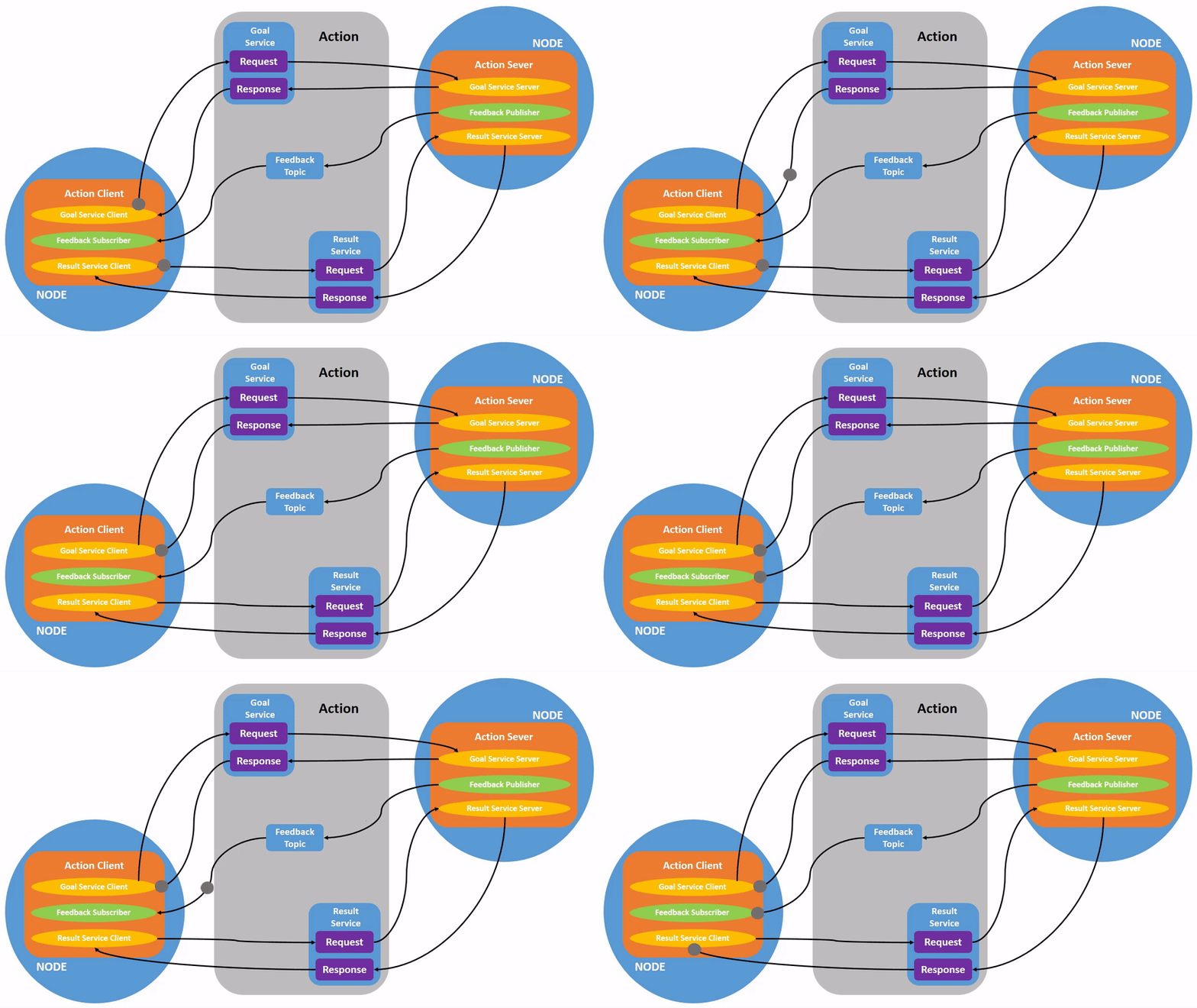
4.5 Communication Patterns: Actions (Goal-Oriented Tasks)
Actions are a higher-level communication primitive in ROS 2 designed for long-running, goal-oriented tasks that may take a significant amount of time to complete. Unlike services, actions provide continuous feedback about the progress of the goal and allow for preemption (canceling a goal before it completes).
Goal, Feedback, Result
An action interaction involves three parts:
- Goal: The request sent by the client to the action server, defining the task to be performed (e.g., "Navigate to a specific waypoint").
- Feedback: Intermediate updates sent by the action server to the client, indicating the progress towards the goal (e.g., "Robot is 50% to waypoint").
- Result: The final outcome of the action, sent by the action server once the goal is completed or aborted (e.g., "Waypoint reached successfully").
Creating Action Clients and Servers (Conceptual)
- Action Server: A node that offers an action.
- Initializes an action server, specifying the action type and callback functions for handling new goals, goal cancellation, and executing the goal.
- Provides periodic feedback to the client during goal execution.
- Sends a final result upon completion or preemption.
- Action Client: A node that requests an action.
- Initializes an action client for a specific action type.
- Sends a goal to the action server.
- Receives and processes feedback messages.
- Receives the final result (or cancellation notification).
Actions are non-blocking from the client's perspective, allowing the client to continue other tasks while waiting for the action to complete.
4.6 Parameters
Parameters in ROS 2 provide a dynamic configuration mechanism for nodes. They allow you to modify a node's behavior at runtime without needing to recompile or restart the node. This is particularly useful for tuning algorithms (e.g., PID gains for motor control), changing operating modes, or providing configuration values.
Dynamic Configuration of Nodes
Each ROS 2 node can declare its own set of parameters, specifying their names, types (e.g., bool, int, double, string), and default values.
Setting and Getting Parameters
Parameters can be:
- Set from the command line (e.g.,
ros2 param set /my_node my_param_name new_value). - Get from the command line (e.g.,
ros2 param get /my_node my_param_name). - Accessed programmatically within the node itself.
- Loaded from YAML files during
ros2 launch.
Parameters enable greater flexibility and reduce the need for hardcoding configuration values, making ROS 2 applications more adaptable to different environments and use cases.
Diagram: ROS 2 Communication Patterns Overview