Chatper 4: ROS 2 Architecture aur Core Concepts
4.1 ROS 2 ka Taaruf
ROS 2 (Robot Operating System 2) apne predecessor, ROS 1, se ek significant evolution represent karta hai, designed hai modern robotics applications ke growing demands ko address karne ke liye. Jab ke ROS 1 ne roboticists ke liye ek robust framework provide kiya, usko limitations face karna pada areas mein jaise real-time performance, security, aur distributed systems ka support. ROS 2 ko ground up se re-architect kiya gaya in challenges ko overcome karne ke liye, embracing ek decentralized aur more flexible communication model.
ROS 1 se Evolution
ROS 1, 2007 mein released, instrumental tha robotics research aur development ko popularize karne mein standardized set offer karte hue tools aur libraries ka. Lekin iska client-server architecture, central master node par reliance, aur native support ki lack quality of service (QoS) ya security ke liye production-grade aur mission-critical robotic systems mein deployment ke liye challenging prove hua.
ROS 2 ka development in pain points ko address karne ke focus ke saath shuru hua. Key design goals mein shamil the:
- Real-time Capabilities: Applications ko support karna strict timing requirements ke saath.
- Security: Robust security features ko incorporate karna by default.
- Distributed Systems: Communication ko enable karna diverse network environments aur heterogeneous computing platforms across.
- Modularity: Highly modular aur reusable software components ko promote karna.
- Multi-robot Support: Coordination ko facilitate karna multiple robots ke darmiyan.
ROS 2 ke Architecture ka Overview
Apne core par, ROS 2 ek decentralized architecture leverage karta hai, moving away ROS 1 ke master node mein inherent single point of failure se. Yeh decentralization primarily enabled hai Data Distribution Service (DDS) standard par reliance se inter-process communication ke liye.
ROS 2 architecture ko visualize kiya ja sakta hai independent processes (nodes) ke collection ke taur par jo middleware layer par communicate karte hain DDS dwara provide kya gaya. Key characteristics mein shamil hain:
- No Central Master: Nodes dynamically discover karte hain each other ko DDS via.
- Vendor Agnostic: DDS ek open standard hai, allowing different DDS implementations (jaise Fast RTPS, Cyclone DDS) ko interchangeably use karne ke liye.
- Advanced Features: DDS inherently provide karta hai Quality of Service (QoS) policies, jo developers ko fine-grained control dete hain communication reliability, latency, aur throughput par.
4.2 Nodes aur the Computation Graph
ROS 2 mein, ek node ek executable process hai jo computation perform karta hai. Nodes kisi bhi ROS 2 system ke fundamental building blocks hain, designed hote hain modular aur single-purpose hone ke liye. Masalan, ek robotic system mein, sensor data read karne ke liye ek node ho sakta hai, ek doosra images process karne ke liye, aur yet ek aur robot motors ko control karne ke liye.
Nodes Kya Hain?
Har node typically ek specific function ya responsibility ko encapsulate karta hai. Yeh modularity developers ko allow karta hai:
- Reuse Components: Individual nodes ko easily different robotic applications mein reuse kiya ja sakta hai.
- Simplify Development: Complex systems ko smaller, manageable parts mein break down kiya ja sakta hai.
- Facilitate Debugging: Issues aksar specific nodes tak isolated kiye ja sakte hain.
- Distribute Workload: Nodes different machines par ya even different operating systems par run kar sakte hain, communicating seamlessly.
Computation Graph ka Concept
ROS 2 mein computation graph ek logical representation hai connections aur data flow ka nodes ke darmiyan. Unlike ROS 1, jahan graph ek central roscore process dwara manage kiya jata tha, ROS 2 ka computation graph ek distributed concept hai, formed dynamically jab nodes discover karte hain each other ko aur establish karte hain communication pathways DDS via.
Computation graph ke key elements mein shamil hain:
- Nodes: Processes jo computation perform karte hain.
- Topics: Named buses over which nodes data exchange karte hain asynchronously (publish/subscribe).
- Services: Request/reply mechanisms synchronous communication ke liye nodes ke darmiyan.
- Actions: Long-running, goal-oriented tasks ke liye feedback ke saath.
Node Management aur Identification
ROS 2 nodes aksar manage kiye jate hain ros2 run (single nodes ke liye) ya ros2 launch (multiple nodes ke liye complex configurations ke saath) use karte hue. Har node ka ek unique node name hota hai apne namespace ke andar, allowing identification aur introspection.
Nodes parameters bhi define kar sakte hain (ek later section mein discuss kiya jayega) jo un ke behavior ko modify karte hain code changes require kiye bagair. Yeh allow karta hai flexible configuration aur tuning robotic systems ka.
4.3 Communication Patterns: Topics (Publishers & Subscribers)
Topics ROS 2 mein asynchronous, many-to-many communication ke liye primary mechanism hain. Yeh ek stream of messages represent karte hain jo nodes publish kar sakte hain ya subscribe kar sakte hain. Yeh publish/subscribe (pub/sub) pattern highly decoupled hai, matlab publishers aur subscribers ko each other ke existence ke baare mein directly janne ki zarorat nahi.
Message Types
Data jo topics par exchange hote hain structured messages hote hain, defined .msg files use karte hue. Yeh files data fields aur un ke types specify karte hain (jaise int32, float64, string, bool). Masalan, ek Twist message type, commonly use hota hai robot velocities ke liye, linear aur angular components contain kar sakta hai.
Publishers aur Subscribers Create Karna (Conceptual)
- Publisher: Ek node jo messages ek topic par send karta hai.
- Ek publisher object initialize karta hai specific topic aur message type ke liye.
- Periodically message instances create karta hai, un ko data se populate karta hai, aur publish karta hai.
- Subscriber: Ek node jo messages ek topic se receive karta hai.
- Ek subscriber object initialize karta hai specific topic aur message type ke liye.
- Ek callback function register karta hai jo execute hota hai jab bhi naya message subscribed topic par aata hai.
Yeh decoupled nature flexible system design ko allow karta hai jahan components add ya remove kiye ja sakte hain puri system ko impact kiye bagair.
4.4 Communication Patterns: Services (Client-Server)
Jab ke topics continuous streams of data ke liye excellent hain, services synchronous, one-to-one communication ke liye ek mechanism provide karte hain, similar traditional function call ke. Ek client service ko ek request send karta hai, aur service us request ko process karta hai aur ek response send karta hai back.
Request-Response Mechanism
Services use hote hain operations ke liye jo direct response require karte hain, jaise:
- Ek action trigger karna (jaise "Take a picture").
- Ek state query karna (jaise "Robot ka current pose kya hai?").
- Ek computation perform karna (jaise "Do numbers add karo").
Service Definition
Services define kiye jate hain .srv files use karte hue, jo dono request aur response message structures specify karte hain. .srv file mein ek --- separator request fields ko response fields se distinguish karta hai.
Service Clients aur Servers Create Karna (Conceptual)
- Service Server: Ek node jo ek service offer karta hai.
- Ek service server object initialize karta hai, service type aur callback function specify karte hue.
- Callback function invoke hota hai jab client ek request send karta hai, request ko process karta hai, aur response return karta hai.
- Service Client: Ek node jo ek service request karta hai.
- Ek service client object initialize karta hai specific service type ke liye.
- Ek request message create karta hai, service server ko send karta hai, aur response ke liye wait karta hai.
Services blocking hote hain, matlab client typically wait karta hai jab tak server ek response provide nahi karta.
4.5 Communication Patterns: Actions (Goal-Oriented Tasks)
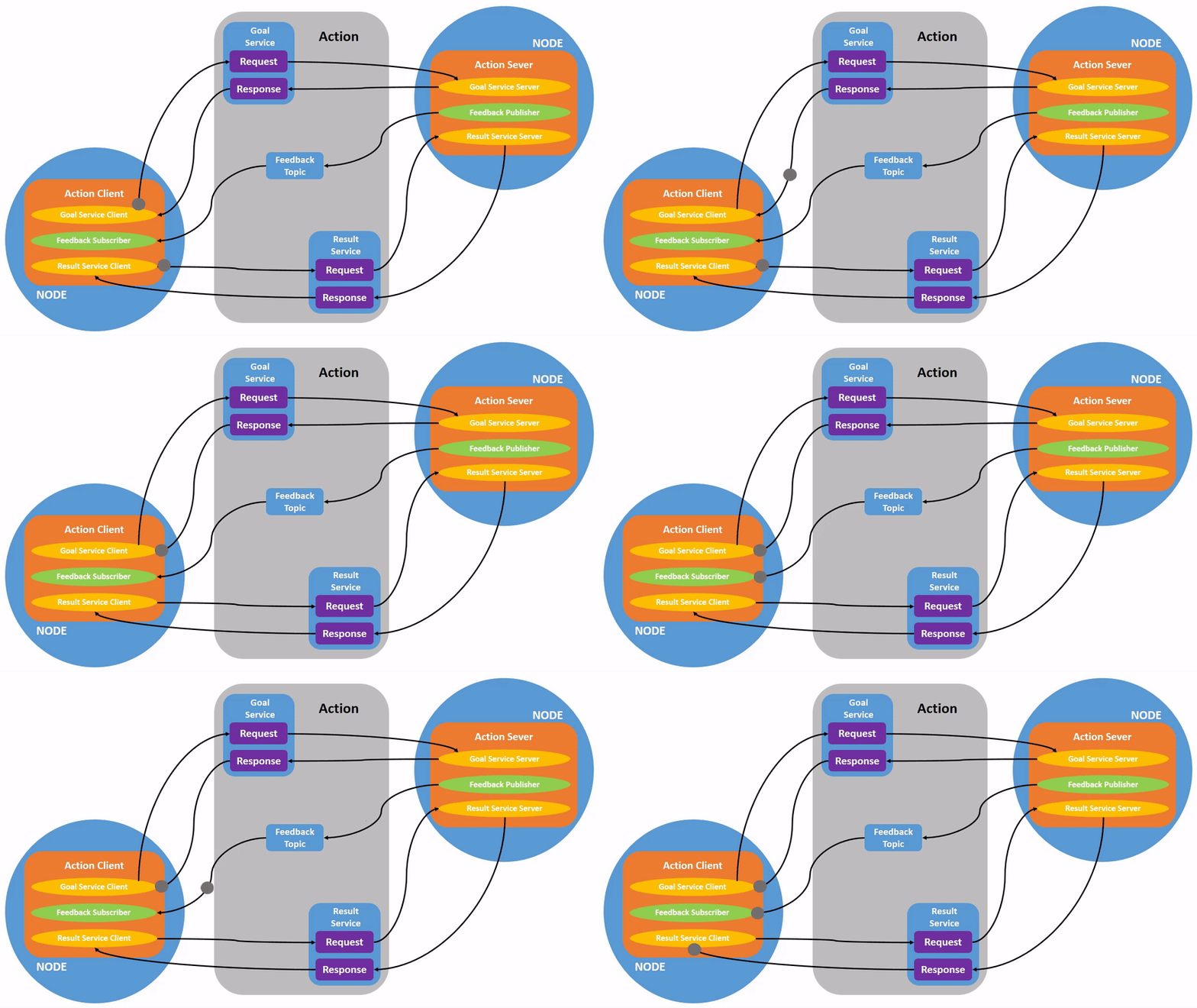
Actions ROS 2 mein ek higher-level communication primitive hain designed long-running, goal-oriented tasks ke liye jo significant amount of time le sakte hain complete karne mein. Unlike services, actions progress ke baare mein continuous feedback provide karte hain goal ka aur preemption allow karte hain (goal ko cancel karna complete hone se pehle).
Goal, Feedback, Result
Ek action interaction mein three parts hote hain:
- Goal: Request jo client action server ko send karta hai, defining task ko perform karna (jaise "Specific waypoint par navigate karo").
- Feedback: Intermediate updates jo action server client ko send karta hai, indicating progress towards goal (jaise "Robot 50% waypoint par hai").
- Result: Final outcome action ka, sent action server dwara once goal complete ya abort ho jaye (jaise "Waypoint successfully reach ho gaya").
Action Clients aur Servers Create Karna (Conceptual)
- Action Server: Ek node jo ek action offer karta hai.
- Ek action server initialize karta hai, action type aur callback functions specify karte hue new goals, goal cancellation, aur goal execution handle karne ke liye.
- Periodic feedback provide karta hai client ko goal execution ke doran.
- Final result send karta hai completion ya preemption par.
- Action Client: Ek node jo ek action request karta hai.
- Ek action client initialize karta hai specific action type ke liye.
- Goal send karta hai action server ko.
- Feedback messages receive aur process karta hai.
- Final result receive karta hai (ya cancellation notification).
Actions non-blocking hote hain client ke perspective se, allowing client ko other tasks continue karne de action complete hone ke liye wait karte hue.
4.6 Parameters
Parameters ROS 2 mein ek dynamic configuration mechanism provide karte hain nodes ke liye. Yeh aapko ek node ke behavior ko modify karne ko allow karte hain runtime par recompile ya restart kiye bagair. Yeh particularly useful hai algorithms ko tune karne ke liye (jaise motor control ke liye PID gains), operating modes change karne, ya configuration values provide karne.
Nodes ka Dynamic Configuration
Har ROS 2 node apne set of parameters declare kar sakta hai, specifying un ke names, types (jaise bool, int, double, string), aur default values.
Parameters Set aur Get Karna
Parameters ho sakte hain:
- Set command line se (jaise
ros2 param set /my_node my_param_name new_value). - Get command line se (jaise
ros2 param get /my_node my_param_name). - Accessed programmatically node ke andar.
- Loaded YAML files se
ros2 launchke doran.
Parameters greater flexibility enable karte hain aur configuration values ko hardcode karne ki need reduce karte hain, making ROS 2 applications more adaptable different environments aur use cases ke liye.
Diagram: ROS 2 Communication Patterns ka Overview