Chapter 3: Robotics Software aur Development Environments
Yeh Chapter ROS aur uske broader ecosystem ka overview provide karega, aur robotic components ke darmiyan communication ko coordinate karne mein uske role ko highlight karega.
1. The Robot Operating System (ROS)
Sophisticated robotic applications ka development often ek robust aur flexible software framework ko necessitate karta hai. Robot Operating System (ROS) ek foundational middleware serve karta hai, jo tools, libraries, aur conventions ka ek collection provide karta hai jo complex robot behaviors build karne ka task simplify karta hai. Apne name ke bagair jab ke ROS, traditional sense mein ek operating system nahi hai, balke robots ke liye ek meta-operating system hai.
1.1 ROS Kya Hai?
ROS ek open-source framework hai jo robot software ke development ko facilitate karne ke liye designed kiya gaya hai standardized communication infrastructure aur libraries aur tools ke rich set ko offer karte hue. Iska primary goal robotics community ke andar code reuse aur collaborative development ko foster karna hai.
- Definition: Ek flexible framework robot software likhne ke liye, comprising ek set of libraries aur tools jo software developers ko robot applications create karne mein help karte hain. Yeh functionality provide karta hai jaise hardware abstraction, device drivers, libraries, visualizers, message-passing, aur package management.
- Purpose: Robot software development ke liye ek common platform create karna, allowing different components (jaise sensor drivers, navigation algorithms, manipulator control) ko seamlessly communicate karne de, regardless of un ke implementation language ya underlying hardware.
- Role in Robotics Development: ROS act karta hai ek glue ki tarah jo robot ke various hardware aur software components ko integrate karta hai. Yeh modular design enable karta hai, jahan developers individual functionalities (jaise perception, planning, control) par focus kar sakte hain as independent nodes jo standardized messaging system par communicate karte hain. Yeh modularity system robustness, debugging, aur scalability ko enhance karta hai.
ROS ne significantly robotics research aur development ke liye entry barrier ko lower kiya hai, enabling rapid prototyping aur robotic systems ke deployment.
ROS 2 Ko Evolution
Jab ke ROS 1 ne groundwork lay kiya, ROS 2 ek significant evolution represent karta hai, addressing modern robotics applications ke liye critical requirements:
- Real-time Capabilities: Enhanced support deterministic, real-time control ke liye, crucial industrial aur safety-critical applications ke liye.
- Multi-robot Systems: Improved architecture multiple robots ko simultaneously manage aur coordinate karne ke liye.
- Security: Built-in security features (authentication, encryption) robotic systems ko unauthorized access se protect karne ke liye.
- Quality of Service (QoS): Configurable communication policies (jaise reliability, durability, latency) diverse application needs ke liye.
- Support for Embedded Systems: Better integration resource-constrained embedded platforms ke saath.
ROS 2 Data Distribution Service (DDS) ko leverage karta hai apne communication layer ke liye, providing ek more robust aur flexible foundation compared ROS 1 ke custom TCP/UDP messaging ko. Yeh shift ROS 2 ko particularly well-suited banata hai professional aur industrial robotics deployments ke liye.
1.2 ROS Core Components
ROS framework ke heart mein ek set of interconnected components lie karte hain jo modularity aur distributed computing ko enable karte hain. In core elements ko samajhna crucial hai ROS-based robotic applications develop aur manage karne ke liye.
1. Nodes
- Definition: ROS mein executable processes jo computation perform karte hain. Har node typically ek single module ke function ke liye responsible hota hai (jaise ek motor ko control karna, sensor data ko process karna, path ko plan karna).
- Function: Specific tasks perform karte hain aur other nodes ke saath communicate karte hain. Nodes kisi bhi language mein write kiye ja sakte hain jis ke liye ROS clients exist hote hain (jaise Python, C++).
- Examples: LiDAR sensor se data read karne ke liye ek node, robot wheels ko control karne ke liye ek node, image mein objects detect karne ke liye ek node.
2. Topics
- Definition: Named buses over which nodes exchange messages. Topics ek many-to-many, anonymous publish/subscribe messaging system provide karte hain.
- Function: Asynchronous, decoupled communication enable karte hain. Ek node ek topic par messages ko "publish" karta hai, aur other nodes us topic ko "subscribe" karte hain messages receive karne ke liye.
- Message Types: Data structures defined kiye jate hain ROS dwara (ya custom-defined) jo messages ke content ko specify karte hain jo topics par pass hote hain (jaise
sensor_msgs/LaserScanLiDAR data ke liye,geometry_msgs/Twistvelocity commands ke liye).
3. Services
- Definition: Nodes ke darmiyan ek request/reply communication mechanism. Unlike topics, services synchronous hote hain aur situations ke liye designed hote hain jahan ek node ko specific action perform karna hota hai aur immediately response receive karna hota hai.
- Function: Actions ke liye use hote hain jo result require karte hain (jaise ek robot ko specific pose par move karne aur confirmation wait karne, sensor calibration trigger karna).
- Request/Response Mechanism: Ek "service server" node ek service provide karta hai, aur ek "service client" node usse request karta hai.
4. Packages
- Definition: ROS software ko organize karne ka primary unit. Ek package contain kar sakta hai ROS nodes, libraries, datasets, configuration files, aur launch files.
- Structure: Typically include hote hain
src(source code),include(headers),msg(message definitions),srv(service definitions),launch(launch files for starting multiple nodes), aurCMakeLists.txt/package.xmlbuild aur dependency management ke liye. - Organization: Code reuse, collaboration, aur distribution ko facilitate karte hain ROS ecosystem ke andar.
5. ROS Master (ROS 1 Specific)
- Role: ROS 1 mein,
roscore(jo ROS Master, parameter server, aurrosoutko include karta hai) ek crucial component hai. ROS Master ROS graph mein ek name server act karta hai, nodes ko find karne aur connections establish karne ko allow karte hue. - Note: ROS 2 mein, centralized master ka concept largely DDS (Data Distribution Service) dwara replace ho gaya hai, jo decentralized discovery aur communication allow karta hai, robustness aur scalability ko enhance karte hue multi-robot systems ke liye.
1.3 ROS Ecosystem Overview
Apne core communication infrastructure ke beyond, ROS ek extensive ecosystem se thrive karta hai—tools, libraries, aur vibrant community ka ek rich collection jo collectively uski utility ko enhance karte hain aur robotics mein rapid development ko foster karte hain.
- Tools: ROS ek suite of command-line aur graphical tools provide karta hai debugging, visualization, aur introspection ke liye.
- RViz: Ek powerful 3D visualizer sensor data display karne ke liye (jaise camera feeds, LiDAR scans), robot models, aur planning outputs. Robot behavior ko samajhne aur complex systems ko debug karne ke liye essential hai.
- rqt_plot: Ek tool ROS topics par published data ko plot karne ke liye, useful hai real-time monitoring ke liye sensor readings ya control signals ka.
- rosbag: Ek utility ROS message data ko record aur playback karne ke liye. Debugging, data analysis, aur offline algorithms develop karne ke liye invaluable hai.
- Gazebo: Ek robust 3D robot simulator jo seamlessly ROS ke saath integrate hota hai, allowing developers ko robot designs aur control algorithms test aur validate karne virtual environment mein physical hardware par deploy karne se pehle.
- Libraries: Ek vast collection of open-source libraries ROS ke capabilities ko extend karta hai various domains across. Yeh include karte hain:
- Navigation Stack: Algorithms provide karta hai autonomous navigation ke liye (jaise localization, mapping, path planning).
- MoveIt!: Ek state-of-the-art framework motion planning, manipulation, aur control ke liye robotic arms ka.
- Perception Libraries: Interfaces common sensors ke liye aur algorithms sensor data process karne ke liye (jaise point cloud processing).
- Community: ROS ki strength significantly amplify hoti hai apne active aur global community dwara developers, researchers, aur users ka. Yeh community contribute karta hai:
- Shared Knowledge: Forums, wikis, tutorials, aur shared code repositories.
- Collaborative Development: Contributions core ROS features aur specialized packages mein.
- Support: Ek readily available network troubleshooting aur learning ke liye.
Yeh comprehensive ecosystem development cycles ko accelerate karta hai, best practices ko promote karta hai, aur highly sophisticated robotic systems ka creation enable karta hai shared resources aur expertise ko leverage karte hue.
2. Programming Languages aur Operating Systems
Operating system aur programming languages ka choice fundamental hai robotics development ke liye, heavily influence karte hue efficiency, performance, aur portability robotic applications ka.
2.1 Linux as the Standard Operating System
Linux robotics development aur deployment ke liye de facto standard operating system banke emerge kiya hai iska numerous advantages due to.
- Importance of Linux:
- Open-Source Nature: Complete transparency aur flexibility provide karta hai, allowing developers ko source code inspect, modify, aur distribute karne de. Yeh critical hai research aur custom robotics projects ke liye.
- Stability aur Reliability: Linux kernels robustness aur long uptime ke liye known hain, essential hai continuous operation robotic systems ke liye.
- Rich Command-Line Tools: Powerful command-line utilities offer karta hai jo indispensable hain scripting, automation, system administration, aur ROS ke saath interaction ke liye.
- Extensive Community Support: Ek large aur active developer community vast ecosystem contribute karta hai software, drivers, aur troubleshooting resources ka.
- Hardware Compatibility: Wide range hardware components ke liye broad support, embedded systems se high-performance workstations tak.
- Security: Apne open-source nature aur active development community security posture ko continuously improve karte hue.
- Common Distributions for Robotics:
- Ubuntu: By far ROS development ke liye most popular Linux distribution. Iska user-friendliness, extensive package repositories, aur strong community support isse ideal choice banata hai beginners aur experienced developers dono ke liye. ROS distributions typically specific Ubuntu versions ke against build aur test kiye jate hain.
- Other distributions jaise Debian, Fedora, aur Arch Linux bhi use hote hain, lekin often ROS ke liye more manual configuration require karte hain.
2.2 Python for Robotics
Python ek exceptionally popular programming language ban gaya hai robotics mein, particularly rapid prototyping aur high-level control applications ke liye.
- Advantages:
- Rapid Prototyping: Iska high-level syntax aur dynamic typing quicker development cycles ko allow karte hain, ideal hai new ideas aur algorithms test karne ke liye.
- Ease of Use: Python ki readability aur gentle learning curve usse accessible banate hain broad range developers ko, including those new robotics ke.
- Extensive Libraries: Ek rich ecosystem scientific aur data analysis libraries ka (jaise NumPy, SciPy, OpenCV, TensorFlow, PyTorch) directly benefit karta hai robotics applications ko, especially areas mein jaise computer vision, machine learning, aur data processing.
- ROS Integration: Python excellent client libraries rakhta hai (jaise
rospyROS 1 mein,rclpyROS 2 mein) jo seamless integration provide karte hain ROS framework ke saath.
- Common Use Cases in ROS:
- Scripting aur Automation: Repetitive tasks ko automate karna, data logging, aur system configuration.
- High-Level Control Logic: Complex behavioral routines, mission planning, aur state machines implement karna.
- User Interfaces: Graphical user interfaces (GUIs) develop karna monitoring aur control robots ke liye.
- Machine Learning aur AI: Advanced AI algorithms integrate karna perception, decision-making, aur learning ke liye.
2.3 C++ for Robotics
C++ robotics mein ek cornerstone programming language bana hua hai, particularly jahan performance, real-time control, aur direct hardware interaction critical hain.
- Advantages:
- Performance: C++ superior performance offer karta hai apne low-level memory management aur native code compilation ke wajah se, crucial hai computationally intensive tasks aur real-time control loops ke liye.
- Real-time Control: Iska predictable execution times usse suitable banate hain hard real-time systems ke liye jahan timing critical hai, jaise motor control aur sensor data acquisition high frequencies par.
- System-Level Programming: Direct access provide karta hai hardware aur memory ko, essential hai efficient device drivers aur low-level control algorithms likhne ke liye.
- Extensive Libraries: Ek wealth of highly optimized libraries available hain linear algebra, computer vision (jaise OpenCV), aur physics simulations ke liye, widely used hain robotics mein.
- ROS Integration: C++ first-class client libraries rakhta hai (jaise
roscppROS 1 mein,rclcppROS 2 mein) jo heavily optimized hain ROS framework ke andar performance ke liye.
- Common Use Cases in ROS:
- Hardware Drivers: Efficient drivers likhna sensors, actuators, aur other robotic hardware ke liye.
- Complex Algorithms: Computationally demanding algorithms implement karna jaise SLAM (Simultaneous Localization and Mapping), motion planning, aur advanced computer vision.
- Low-Level Control: Precise aur fast control loops develop karna robot joints aur kinematics ke liye.
- Middleware Components: Core ROS components aur high-performance communication systems often C++ mein implement kiye jate hain.
3. Robotics Development Environment Setup
Ek well-configured development environment paramount hai efficient aur collaborative robotics engineering ke liye. Yeh necessary tools aur infrastructure provide karta hai robot software likhne, test karne, aur deploy karne ke liye.
3.1 Essential Tools aur IDEs
Kisi bhi robotics development workflow ka foundation ek suite of essential software tools mein lie karta hai:
- Text Editors aur Integrated Development Environments (IDEs):
- Text Editors: Lightweight tools jaise
nano,vim, yaSublime Textquick edits aur scripting ke liye excellent hain. - IDEs: Comprehensive features offer karte hain jaise code completion, debugging, syntax highlighting, aur project management. Robotics mein popular choices mein shamil hain:
- VS Code (Visual Studio Code): Ek highly popular, lightweight, yet powerful IDE extensive extensions ke saath C++, Python, ROS, aur Git integration ke liye. Yeh often ROS development ke liye recommended choice hota hai.
- Eclipse/QtCreator: More traditional, heavier IDEs primarily C++ development ke liye use hote hain, especially jab Qt-based graphical interfaces ke saath kaam karte ho.
- Text Editors: Lightweight tools jaise
- Build Systems: Robotics projects, especially jo ROS use karte hain, specialized build systems par rely karte hain dependencies manage karne, code compile karne, aur executables generate karne ke liye.
- Catkin (ROS 1): Traditional build system ROS 1 packages ke liye. Yeh
CMakeuse karta hai build definitions ke liye aur workspace overlay mechanism provide karta hai. - Colcon (ROS 2): Build tool ROS 2 ke liye, offering improved flexibility, speed, aur compatibility various build tools ke saath (jaise
CMake,ament_cmake,setup.py). Yeh more general-purpose aur extensible hone ke liye designed hai.
- Catkin (ROS 1): Traditional build system ROS 1 packages ke liye. Yeh
- Terminals aur Shells: Essential hain Linux operating system ke saath interact karne, ROS commands run karne, aur scripts execute karne ke liye. Tools jaise
bashyazshcommonly use hote hain.
Conceptual Step-by-Step Guide for Environment Setup
Ek robust robotics development environment setup karna typically involve karta hai several key steps. Jab ke exact commands aur configurations specific Linux distribution aur ROS version ke basis par vary kar sakte hain, general flow consistent bana hua hai:
- Install Linux: Ek compatible Linux distribution install karte hue shuru karo, most commonly Ubuntu LTS (Long Term Support) kyun ke ROS community mein iska wide support hai.
- Reference: Official Ubuntu Installation Guide
- Install ROS: ROS installation instructions follow karo apne chosen Linux distribution aur ROS version ke liye (ROS 1 Noetic ya ROS 2 Humble/Iron/Foxy, etc.). Ismein typically ROS repositories add karna, packages update karna, aur desktop-full version install karna involve hota hai.
- Reference: ROS 1 Installation Guide or ROS 2 Installation Guide
- Configure ROS Environment: ROS setup files ko source karna ensure karne ke liye ke ROS environment variables correctly set ho apne terminal session mein.
- Install Essential Tools: Ek preferred IDE install karna (jaise VS Code) relevant extensions ke saath C++, Python, aur ROS ke liye. Ek build system like
colcon(ROS 2 ke liye) install karna. - Set Up Workspace: Ek ROS workspace directory create karna jahan aap apne robotic projects develop karouge (jaise
~/ros2_ws/src). - Version Control Setup: Git initialize karna, user information configure karna, aur remote repository ke saath connection establish karna (jaise GitHub, GitLab).
Yeh guide ek conceptual roadmap provide karta hai; always official aur latest ROS documentation ko refer karo precise aur up-to-date installation instructions ke liye.
3.2 Version Control Best Practices
Version control kisi bhi software development project mein ek indispensable practice hai, aur robotics exception nahi hai. Yeh developers ko changes track karne, previous versions par revert karne, aur effectively collaborate karne allow karta hai. Git robotics community mein most widely adopted version control system hai.
- Importance of Git:
- Change Tracking: Har modification ko record karta hai codebase mein, providing ek detailed history.
- Collaboration: Multiple developers ko same project par concurrently kaam karne ko enable karta hai each other ka work overwrite kiye bagair.
- Branching aur Merging: Isolated development facilitate karta hai features ya bug fixes ke (branches) aur un ka integration main codebase mein (merging).
- Backup aur Recovery: Ek robust backup mechanism provide karta hai aur easy restoration allow karta hai kisi bhi previous state par.
- Workflow for Collaborative Robotics Development:
- Centralized Repository: Projects typically hosted hote hain platforms jaise GitHub, GitLab, ya Bitbucket par.
- Main Branch Protection:
main(yamaster) branch usually protected hota hai, requiring code reviews (pull requests/merge requests) changes merge hone se pehle. - Feature Branches: Developers separate branches create karte hain har naye feature ya bug fix ke liye.
- Frequent Commits: Small, atomic commits descriptive messages ke saath changes track karna aur debug karna easier banate hain.
- Regular Pull/Fetch: Local repositories ko up-to-date rakhna remote changes ke saath.
- Code Review: Essential hai code quality maintain karne, knowledge share karne, aur potential issues early catch karne ke liye.
- Continuous Integration/Continuous Deployment (CI/CD): Testing aur deployment process ko automate karna code quality aur rapid delivery ensure karne ke liye.
4. Computing Architectures for Robotics
Robotic applications ek wide spectrum mein span karte hain computational demands ka, simple sensor processing se complex AI algorithms aur fleet management tak. Choice computing architecture ka deploying aur managing ke liye yeh applications critical hai, impacting karte hue performance, cost, aur scalability. Yeh section explore karta hai three primary architectures: workstations, edge devices, aur cloud systems.
4.1 Workstations
Workstations traditional desktop ya laptop computers hain jo robotics mein primary development aur simulation platforms serve karte hain.
- Characteristics: High-performance processors (CPUs, GPUs), ample RAM, large storage capacities.
- Advantages:
- Processing Power: Computationally intensive tasks handle karne capable, complex simulations (jaise Gazebo), aur AI model training.
- Resources: Abundant memory aur storage large datasets aur development tools ke liye.
- Development Environment: Ek comfortable aur familiar environment provide karte hain coding, debugging, aur visualization ke liye.
- Typical Use Cases:
- Development: Robot software likhna, compile karna, aur test karna.
- Simulation: Detailed physics simulations run karna algorithms validate karne ke liye physical hardware deployment se pehle.
- Data Analysis: Processing aur analyzing large datasets robot operations se.
- High-Fidelity Visualization: Tools use karna jaise RViz 3D visualization ke liye sensor data aur robot states ka.
4.2 Edge Devices
Edge devices robotics mein compact, often low-power computing hardware refer karte hain deployed directly robot par ya very close uske. Yeh powerful workstations aur resource-constrained microcontrollers ke darmiyan gap bridge karte hain.
- Characteristics: Typically System-on-Chips (SoCs) feature karte hain integrated CPUs, GPUs, aur specialized AI accelerators ke saath (jaise NPUs). Optimized low power consumption aur small form factors ke liye.
- Advantages:
- Low Latency: Locally data ko process karna delays minimize karta hai, crucial hai real-time control aur rapid response environmental changes ko ke liye.
- On-board Processing: External communication par reliance reduce karta hai critical functions ke liye, enhancing autonomy aur robustness connectivity-challenged environments mein.
- Privacy aur Security: Sensor data source par process aur filter kiya ja sakta hai, raw data transmission ki amount reduce karte hue aur privacy enhance karte hue.
- Typical Use Cases:
- On-robot Computations: Perception algorithms run karna (jaise camera feeds se object detection), local path planning, aur immediate motor control loops.
- Real-time Control: High-frequency control actions execute karna directly robot par.
- Autonomous Operation: Robots ko independently tasks perform karne ko enable karna central server ya cloud ke saath constant connection ke bagair.
- Examples:
- NVIDIA Jetson Series: AI-powered robotics ke liye popular, offering significant GPU acceleration deep learning tasks ke liye (jaise Jetson Nano, Xavier NX, Orin).
- Raspberry Pi: Ek versatile aur affordable single-board computer, often used smaller robotic projects, educational platforms, aur prototyping ke liye.
- Google Coral: AI accelerators fast on-device inference ke liye.
4.3 Cloud Systems
Cloud systems remote, scalable computing resources aur infrastructure offer karte hain internet par. Robotics mein, cloud integration allow karta hai heavy computation ko offload karne, centralized management, aur vast data storage capabilities leverage karne ko.
- Characteristics: Remotely hosted servers aur services, high scalability, pay-as-you-go models.
- Advantages:
- Scalability: Easily computational resources ko scale up ya down kar sakte ho required hone ke basis par, ideal hai large robot fleets manage karne ya peak processing demands handle karne ke liye.
- Remote Management: Centralized control aur monitoring robots ka, enabling fleet management, over-the-air updates, aur diagnostic access anywhere se.
- Heavy Computation: Capable hai highly demanding tasks run karne jaise complex AI model training (jaise deep learning for vision), large-scale simulations, ya massive data analytics.
- Data Storage aur Processing: Secure aur scalable storage sensor data, operational logs, aur processed information ke liye, powerful tools ke saath analytics ke liye.
- Typical Use Cases:
- Fleet Management: Hundreds ya thousands robots ke operations ko coordinate aur optimize karna.
- Complex AI Processing: Deep learning models train karna, advanced mapping (jaise global consistent maps), aur resource-intensive planning.
- Large-Scale Simulation: Numerous simulations parallel mein run karna robot behaviors test aur refine karne ke liye.
- Data Archiving aur Analytics: Vast amounts data store aur analyze karna robots dwara collected performance optimization, predictive maintenance, aur new feature development ke liye.
- Cloud Robotics Concepts:
- Offloading Computation: Computationally intensive tasks move karna (jaise high-resolution mapping, complex planning) robot se cloud tak.
- Collective Learning: Robots cloud ke saath experiences aur data share karte hain, jahan models improve kiye ja sakte hain aur phir entire fleet par deploy kiye ja sakte hain.
- Human-Robot Collaboration in the Cloud: Human operators robots operations ko remotely supervise aur assist karte hain cloud interfaces through.
Summary of Computing Platforms for Robotics
| Platform | Advantages | Limitations | Typical Use Cases |
|---|---|---|---|
| Workstation | High processing power, rich development environment | Not mobile, power-intensive, high latency for robot | Development, heavy simulation, AI model training |
| Edge Device | Low latency, on-board processing, autonomy | Limited processing power, storage, scalability | Real-time control, on-robot perception, local autonomy |
| Cloud System | Scalability, remote management, heavy computation | High latency, internet dependency, security concerns | Fleet management, large-scale data analytics, complex AI |
5. Learning Outcomes
Is chapter ka successfully completion karne ke baad, you should be able to:
- Define ROS aur iske core components: Clearly articulate karna ke ROS kya hai aur iske fundamental components describe karna (nodes, topics, services, packages).
- Explain the role of Linux aur choice of Python/C++ in robotics: Samajhna ke Linux kyun standard OS hai aur Python aur C++ ke primary use cases aur advantages robotics programming mein.
- Outline the setup of a robotics development environment, including version control: Describe karna essential tools, IDEs, build systems, aur best practices Git use karne ke liye collaborative robotics projects mein.
- Differentiate between workstations, edge devices, aur cloud systems for robotic applications: Samajhna characteristics, advantages, limitations, aur typical use cases har computing architecture ka robotics deployment aur management mein.
Part 2: The Robotic Nervous System – ROS 2
Chatper 4: ROS 2 Architecture aur Core Concepts
4.1 ROS 2 ka Taaruf
ROS 2 (Robot Operating System 2) apne predecessor, ROS 1, se ek significant evolution represent karta hai, designed hai modern robotics applications ke growing demands ko address karne ke liye. Jab ke ROS 1 ne roboticists ke liye ek robust framework provide kiya, usko limitations face karna pada areas mein jaise real-time performance, security, aur distributed systems ka support. ROS 2 ko ground up se re-architect kiya gaya in challenges ko overcome karne ke liye, embracing ek decentralized aur more flexible communication model.
ROS 1 se Evolution
ROS 1, 2007 mein released, instrumental tha robotics research aur development ko popularize karne mein standardized set offer karte hue tools aur libraries ka. Lekin iska client-server architecture, central master node par reliance, aur native support ki lack quality of service (QoS) ya security ke liye production-grade aur mission-critical robotic systems mein deployment ke liye challenging prove hua.
ROS 2 ka development in pain points ko address karne ke focus ke saath shuru hua. Key design goals mein shamil the:
- Real-time Capabilities: Applications ko support karna strict timing requirements ke saath.
- Security: Robust security features ko incorporate karna by default.
- Distributed Systems: Communication ko enable karna diverse network environments aur heterogeneous computing platforms across.
- Modularity: Highly modular aur reusable software components ko promote karna.
- Multi-robot Support: Coordination ko facilitate karna multiple robots ke darmiyan.
ROS 2 ke Architecture ka Overview
Apne core par, ROS 2 ek decentralized architecture leverage karta hai, moving away ROS 1 ke master node mein inherent single point of failure se. Yeh decentralization primarily enabled hai Data Distribution Service (DDS) standard par reliance se inter-process communication ke liye.
ROS 2 architecture ko visualize kiya ja sakta hai independent processes (nodes) ke collection ke taur par jo middleware layer par communicate karte hain DDS dwara provide kya gaya. Key characteristics mein shamil hain:
- No Central Master: Nodes dynamically discover karte hain each other ko DDS via.
- Vendor Agnostic: DDS ek open standard hai, allowing different DDS implementations (jaise Fast RTPS, Cyclone DDS) ko interchangeably use karne ke liye.
- Advanced Features: DDS inherently provide karta hai Quality of Service (QoS) policies, jo developers ko fine-grained control dete hain communication reliability, latency, aur throughput par.
4.2 Nodes aur the Computation Graph
ROS 2 mein, ek node ek executable process hai jo computation perform karta hai. Nodes kisi bhi ROS 2 system ke fundamental building blocks hain, designed hote hain modular aur single-purpose hone ke liye. Masalan, ek robotic system mein, sensor data read karne ke liye ek node ho sakta hai, ek doosra images process karne ke liye, aur yet ek aur robot motors ko control karne ke liye.
Nodes Kya Hain?
Har node typically ek specific function ya responsibility ko encapsulate karta hai. Yeh modularity developers ko allow karta hai:
- Reuse Components: Individual nodes ko easily different robotic applications mein reuse kiya ja sakta hai.
- Simplify Development: Complex systems ko smaller, manageable parts mein break down kiya ja sakta hai.
- Facilitate Debugging: Issues aksar specific nodes tak isolated kiye ja sakte hain.
- Distribute Workload: Nodes different machines par ya even different operating systems par run kar sakte hain, communicating seamlessly.
Computation Graph ka Concept
ROS 2 mein computation graph ek logical representation hai connections aur data flow ka nodes ke darmiyan. Unlike ROS 1, jahan graph ek central roscore process dwara manage kiya jata tha, ROS 2 ka computation graph ek distributed concept hai, formed dynamically jab nodes discover karte hain each other ko aur establish karte hain communication pathways DDS via.
Computation graph ke key elements mein shamil hain:
- Nodes: Processes jo computation perform karte hain.
- Topics: Named buses over which nodes data exchange karte hain asynchronously (publish/subscribe).
- Services: Request/reply mechanisms synchronous communication ke liye nodes ke darmiyan.
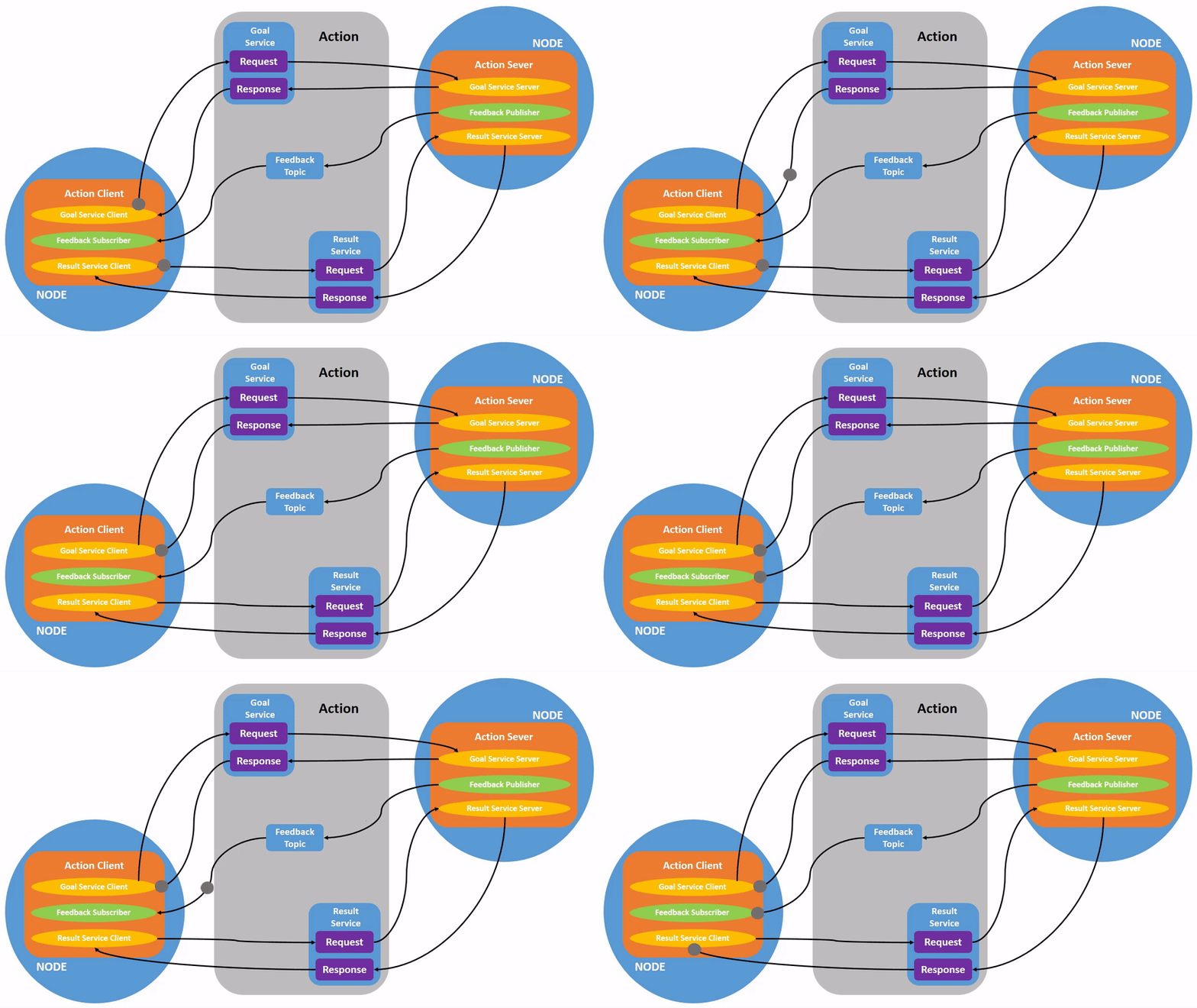
- Actions: Long-running, goal-oriented tasks ke liye feedback ke saath.
Node Management aur Identification
ROS 2 nodes aksar manage kiye jate hain ros2 run (single nodes ke liye) ya ros2 launch (multiple nodes ke liye complex configurations ke saath) use karte hue. Har node ka ek unique node name hota hai apne namespace ke andar, allowing identification aur introspection.
Nodes parameters bhi define kar sakte hain (ek later section mein discuss kiya jayega) jo un ke behavior ko modify karte hain code changes require kiye bagair. Yeh allow karta hai flexible configuration aur tuning robotic systems ka.
4.3 Communication Patterns: Topics (Publishers & Subscribers)
Topics ROS 2 mein asynchronous, many-to-many communication ke liye primary mechanism hain. Yeh ek stream of messages represent karte hain jo nodes publish kar sakte hain ya subscribe kar sakte hain. Yeh publish/subscribe (pub/sub) pattern highly decoupled hai, matlab publishers aur subscribers ko each other ke existence ke baare mein directly janne ki zarorat nahi.
Message Types
Data jo topics par exchange hote hain structured messages hote hain, defined .msg files use karte hue. Yeh files data fields aur un ke types specify karte hain (jaise int32, float64, string, bool). Masalan, ek Twist message type, commonly use hota hai robot velocities ke liye, linear aur angular components contain kar sakta hai.
Publishers aur Subscribers Create Karna (Conceptual)
- Publisher: Ek node jo messages ek topic par send karta hai.
- Ek publisher object initialize karta hai specific topic aur message type ke liye.
- Periodically message instances create karta hai, un ko data se populate karta hai, aur publish karta hai.
- Subscriber: Ek node jo messages ek topic se receive karta hai.
- Ek subscriber object initialize karta hai specific topic aur message type ke liye.
- Ek callback function register karta hai jo execute hota hai jab bhi naya message subscribed topic par aata hai.
Yeh decoupled nature flexible system design ko allow karta hai jahan components add ya remove kiye ja sakte hain puri system ko impact kiye bagair.
4.4 Communication Patterns: Services (Client-Server)
Jab ke topics continuous streams of data ke liye excellent hain, services synchronous, one-to-one communication ke liye ek mechanism provide karte hain, similar traditional function call ke. Ek client service ko ek request send karta hai, aur service us request ko process karta hai aur ek response send karta hai back.
Request-Response Mechanism
Services use hote hain operations ke liye jo direct response require karte hain, jaise:
- Ek action trigger karna (jaise "Take a picture").
- Ek state query karna (jaise "Robot ka current pose kya hai?").
- Ek computation perform karna (jaise "Do numbers add karo").
Service Definition
Services define kiye jate hain .srv files use karte hue, jo dono request aur response message structures specify karte hain. .srv file mein ek --- separator request fields ko response fields se distinguish karta hai.
Service Clients aur Servers Create Karna (Conceptual)
- Service Server: Ek node jo ek service offer karta hai.
- Ek service server object initialize karta hai, service type aur callback function specify karte hue.
- Callback function invoke hota hai jab client ek request send karta hai, request ko process karta hai, aur response return karta hai.
- Service Client: Ek node jo ek service request karta hai.
- Ek service client object initialize karta hai specific service type ke liye.
- Ek request message create karta hai, service server ko send karta hai, aur response ke liye wait karta hai.
Services blocking hote hain, matlab client typically wait karta hai jab tak server ek response provide nahi karta.
4.5 Communication Patterns: Actions (Goal-Oriented Tasks)
Actions ROS 2 mein ek higher-level communication primitive hain designed long-running, goal-oriented tasks ke liye jo significant amount of time le sakte hain complete karne mein. Unlike services, actions progress ke baare mein continuous feedback provide karte hain goal ka aur preemption allow karte hain (goal ko cancel karna complete hone se pehle).
Goal, Feedback, Result
Ek action interaction mein three parts hote hain:
- Goal: Request jo client action server ko send karta hai, defining task ko perform karna (jaise "Specific waypoint par navigate karo").
- Feedback: Intermediate updates jo action server client ko send karta hai, indicating progress towards goal (jaise "Robot 50% waypoint par hai").
- Result: Final outcome action ka, sent action server dwara once goal complete ya abort ho jaye (jaise "Waypoint successfully reach ho gaya").
Action Clients aur Servers Create Karna (Conceptual)
- Action Server: Ek node jo ek action offer karta hai.
- Ek action server initialize karta hai, action type aur callback functions specify karte hue new goals, goal cancellation, aur goal execution handle karne ke liye.
- Periodic feedback provide karta hai client ko goal execution ke doran.
- Final result send karta hai completion ya preemption par.
- Action Client: Ek node jo ek action request karta hai.
- Ek action client initialize karta hai specific action type ke liye.
- Goal send karta hai action server ko.
- Feedback messages receive aur process karta hai.
- Final result receive karta hai (ya cancellation notification).
Actions non-blocking hote hain client ke perspective se, allowing client ko other tasks continue karne de action complete hone ke liye wait karte hue.
4.6 Parameters
Parameters ROS 2 mein ek dynamic configuration mechanism provide karte hain nodes ke liye. Yeh aapko ek node ke behavior ko modify karne ko allow karte hain runtime par recompile ya restart kiye bagair. Yeh particularly useful hai algorithms ko tune karne ke liye (jaise motor control ke liye PID gains), operating modes change karne, ya configuration values provide karne.
Nodes ka Dynamic Configuration
Har ROS 2 node apne set of parameters declare kar sakta hai, specifying un ke names, types (jaise bool, int, double, string), aur default values.
Parameters Set aur Get Karna
Parameters ho sakte hain:
- Set command line se (jaise
ros2 param set /my_node my_param_name new_value). - Get command line se (jaise
ros2 param get /my_node my_param_name). - Accessed programmatically node ke andar.
- Loaded YAML files se
ros2 launchke doran.
Parameters greater flexibility enable karte hain aur configuration values ko hardcode karne ki need reduce karte hain, making ROS 2 applications more adaptable different environments aur use cases ke liye.
Diagram: ROS 2 Communication Patterns ka Overview